Ogni giorno offriamo programmi GRATUITI che altrimenti dovresti comprare!
Giveaway of the day — Windows Explorer Tracker 2.0
Windows Explorer Tracker 2.0 era disponibile come app gratuita il 09 febbraio 2016!
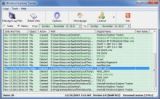
Windows Explorer Tracker viene utilizzato per tracciare/monitorare e registrare le operazioni in Windows Explorer automaticamente, come "Cancella", "Rinomina", "Crea", "Inserisci", "Aggiungi" e "Rimuovi" su file, cartelle, drive e supporti di memoria. Puppoi anche utilizzarlo per tracciare e registrare azioni su host remoti attraverso i drive di rete mappati. Registra le operazioni originali in alcuni file .log e li nomina in base alla data.
Nota bene: Il programma comprende 1 Anno di Aggiornamenti Gratuiti. Ottieni 50% di sconto per la Licenza Singola (1PC) e una Licenza Personale (3 PC) con Aggiornamenti Illimitati solo per oggi!
The current text is the result of machine translation. You can help us improve it.
Requisiti di Sistema:
Windows XP/ 2003/ Vista/ 7/ 8/ 8.1/ 10 (x32/x64)
Produttore:
TriSun Software LimitedHomepage:
http://www.trisunsoft.com/windows-explorer-tracker/Dimensione File:
5.7 MB
Prezzo:
$19.99
Programmi correlati
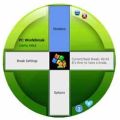
Offre promemoria appropriati per ridurre il tuo Rischio di Lesione da Stress Ripetitivo. Offre promemoria di pausa di vari tipi, come una piccola pausa, stretching, esercizi per gli occhi e camminare, in base alla modalità d'uso del tuo PC, e tutte le impostazioni sono configurabili.

Trova rapiudamente i file duplicati sui tuoi drive, in vase ai contennuti del file, e puooi rimuovere i file indesiderati come desideri, in modo tale da recuperare prezioso spazio sul disco, ridurre i costi di gestione ed evitare confisione indesiderata.

Ti permette di vedere rapidamente le dimensioni di tutti i drive/le directory/i file in una struttura ad albero, in modo tale da permetterti di pulire manualmente il disco in maniera facile. Supporta l'esecuzione delle risorse in modalità batch.
Un calcolatore temporale di date completo, ottieni la data, i giorni tra le date e molto altro.

Advanced Recent Access è progettato per visualizzare e aprire le risorse usate di recente (file e directory). E puoi visualizzare maggiori proprietà delle risorse recenti, come il percorso, la dimensione, il tipo, la data di modifica e la data di creazione.
GIVEAWAY download basket




App gratis per iPhone »





App gratis per Android »




Commenti su Windows Explorer Tracker 2.0
Please add a comment explaining the reason behind your vote.
I use freeware Activity Indicator v1.1.5.32 which has more options, and for those laptop users that do not have HDD LEDs, this doubles as an status indicator that you can customize, just be sure to disable logging in that case.
And for those that want even more tools, the extensive freeware WSCC (Windows System Control Center) v2.5.0.7 is the go-to toolbox that you should have on your PC, thumb-drive, recovery disc, etc. It's a powerhouse of tools from Nirsoft and Windows Sysinternals with an attractive GUI that you can customize yourself. The included binaries are in x86 and x64, with GUI option to use the x64 version whenever possible.
Thanks GOTD for showing something new, but today's offer is not for me.
Save | Cancel
Installed and registered without any difficulties and on opening a clean interface.
After running for a couple hours it has listed a number of files been created deleted etc.
I'm sure there are rare occasions when this information would be useful but the limited functions available do not make it a particularly useful program.
A Free program I have found that is much more useful for gleaning information about what exactly the system is doing is available at the following link:-
http://systemexplorer.net/
Today's download will go in my folder called Tools, it contains many programs both free and paid for that help analyse many problems that occur in a system.
Save | Cancel
XP-Man
What I like about System Explorer is the Snapshot feature, which can record before and after scenarios which includes registry and file changes occurring on the hard drive. The initial Snapshot takes the longest, but viewing changes using the tree-like structure makes it easy to see what differences have occurred.
The only thing I wish it did right is when opening Windows Registry from it, as it will launch the x86 version instead of the x64 version if on a x64 OS. The end result not seeing the 'full' registry picture if one were to launch it manually, via the Run Box for example, that starts the expected x64 version. To be sure, the x64 version of Regedit has the Wow6432Node that mirrors (for a lack of a better word) what the x86 version of Regedit can show.
System Explorer shines with it's on-demand Virus-Total scanner, useful as a second 'opinion' to the installed protection one has on their PC to test any file either in memory running or on the local drive.
Thanks for your comment XP-Man, and good luck stocking your Tool Box with more awesome programs.
Save | Cancel
There are 2 usual reasons I think that files are added or deleted -- software installation or removal, or in the course of working on whatever, files get saved & may be deleted.
Though we can forget later, we know when we save or delete a file. We may not know what intermediate or temporary files the software we're using creates, or if it deletes those files afterwards. Working with audio & video files for example, those often temporary files can get quite large, & don't always go away after you close the software. That's one possible use for Windows Explorer Tracker.
We you install software it can be useful to know what get's added where. It helps you to judge that installation's impact on Windows & your system disk, e.g. the other day a GOTD added 300MB to the ProgramData folder, regardless where the program itself was installed, which made a difference for many people running Windows on a SSD -- the size of a SSD depends on how much you spend, with the majority of SSDs in use not having much storage space to spare.
It also helps if/when you decide to remove a program... save the logs from Windows Explorer Tracker that you made during installation, along with those from something like Regshot [which records changes to the registry], & you've got a pretty complete picture of what should be removed. And it can help troubleshooting when installing software breaks something.
If you are someone who doesn't like temporary files sticking around, running Windows Explorer Tracker when software updates should tell you where the update's setup files are stored & if they're deleted afterwards -- I've seen software updates leave over 1GB behind. Similarly you might find it easier than manually checking yourself if Windows 7-8.1 has downloaded, or started to download the setup files for 10.
That said, where it might be most useful would be using Windows Explorer Tracker much the same way IT staff may monitor activity to spot hackers & malware, though granted they have better tools to search the logs looking for trouble. A couple few weeks ago a guy commented on another site that the only sign he had that a system was infected was a keylogger log file he happened to see in the temp folder just by chance. New files are not created or saved all that often, & while looking at what Windows Explorer Tracker records isn't 100% foolproof [companies still have their systems breached despite logging] it could [should] probably help with the more common varieties of malware.
Save | Cancel
I give the publisher high marks for originality. We tend to see one after another softwares doing similar tasks (video converters, PDF manipulators) so this is an interesting change of pace.
It's not a program I can see me using so I'll decline but I do decline with a big thank you to the publisher and GOTD.
Save | Cancel