Ogni giorno offriamo programmi GRATUITI che altrimenti dovresti comprare!
Giveaway of the day — Startup Defender 1.9.5
Startup Defender 1.9.5 era disponibile come app gratuita il 13 ottobre 2009!


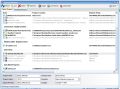
Startup Defender è un piccolo programma che monitora costantemente la cartella dell’avvio automatico, evitando la partenza di software indesiderati all’accensione del PC. Quando un programma prova a situarsi nella cartella di avvio automatico, Startup Defender avverte l’utente tempestivamente.
Il programma permette anche di abilitare/disabilitare gli elementi correnti presenti in avvio automatico. Altre interessanti funzioni sono poi quelle relative alla ricerca dei programmi su Google ed al blocco automatico di tutti i programmi che tentano di impostarsi in avvio automatico. Per i programmi insistenti, quelli che cercano continuamente di impostarsi per l'avvio automatico, potete usare una comoda funzionalità di blocco automatico.
The current text is the result of machine translation. You can help us improve it.
Requisiti di Sistema:
Windows 2003, XP, 2000, 98, Me, Vista; Microsoft .NET Framework 2.0
Produttore:
Zards SoftwareHomepage:
http://www.zardssoftware.com/startup/startup.htmlDimensione File:
1.21 MB
Prezzo:
$19.95
GIVEAWAY download basket




Commenti su Startup Defender 1.9.5
Please add a comment explaining the reason behind your vote.

The Good
* Easy to use.
* Monitors start up programs, current running processes, and services.
* Monitors startup folder and registry and notifies user when a new program has been added to autorun on Windows boot.
* Allows user to delete, block, or perma-block ('auto block") any program that autoruns on Windows boot.
* Allows user to manually run any startup program on demand.
* Allows user to manually kill or "ban" any processes so they are automatically killed/closed whenever Startup Defender detects them.
* Allows user to start, stop, pause, or resume services.
* Displays basic information on a startup/autorun program.
* Nifty "Google it" button to Google any program/process.
The Bad
* "Explore Program Location" for startup programs just opens up my desktop instead of the program folder.
* No feature to delay autorun programs.
* Can't "auto block" start up programs after the initial detection and prompt.
* Not particularly clear what the "PC startup optimizer" feature is or what it is supposed to do.
* Uses Google.com.au instead of Google.com or region-relative Google >.>'.
Free Alternatives
AnVir Task Manager
WinPatrol
For final verdict, recommendations, and full review please click here.

As I've stated on previous giveaways of this, I won't be testing it due to problems with other Zards offerings adding unwanted entries to the registry. That doesn't necessarily mean that Startup Defender does, but I'm not going to risk it.
Between my security software, AnVir (Security Suite), and Autoruns, I'm well covered. I used WinPatrol years ago, and I tried the free version when Bits du Jour was offering a discount on the Pro version, but it seemed like a toy compared to AnVir. Also, I had problems with false alerts from WinPatrol, possibly from it seeing things for the first time. One nice feature of WinPatrol is that it will monitor file type associations, which the others don't.
Various startup managers:
MSconfig - Few locations checked, but does have some debugging features which aren't in the other tools.
Windows Defender - Standard on Vista, few locations checked, shows code signatures.
AnVir - Few locations checked for startup, but has lots of nice features. The most features are in the higher-end versions, which unfortunately have become quite expensive since few people are willing to pay for task managers. Version comparison. Top versions have many features, such as startup monitoring, auto-remove, auto-terminate, can start as service, to tray, or to floating icon, delayed startup, auto-set priority, generate startup items report, search online, check files for malware online, jump to in RegEdit, shows code signatures, and many other features.
WinPatrol - Few locations checked, but does have startup monitoring, delayed startup, auto-remove, file extension monitoring. Version comparison. Also, I don't remember whether WinPatrol defaults to allowing or blocking new items when you can't answer the prompt due to a reboot, which may be a problem during software installations, crashes, etc. (AnVir defaults to allow.)
Microsoft Sysinternals Autoruns - By far the most comprehensive listing of startup items, can save configuration for (unfortunately) limited comparison, search online, show configuration for other users, jump to (depends upon type, generally opens RegEdit), verify code signatures, etc.
What's Running - long out of development
Headlight Software Desktop Armor - long out of development
Acelogix Software StartUp Guard - long out of development
Mike Lin's Startup Control Panel, StartupMonitor - long out of development
There are more Freeware Tool to do this, not a good giveaway...
Alternative:
Acelogix Startup Guard www.acelogix.com
Startup monitor www.mlin.net
IK haven't tried this program, but there is a free one that I have used for many years and it has never failed me. I am speaking of Mike Lin's Startup Monitor. His Startup Control Panel is also a gem.
I would use Spybot S&D, which also has a TeaTimer part, to prevent programs writing into startup - free and prevents your system from spyware too.
App gratis per iPhone »





App gratis per Android »





Sarà pure utile ai neofiti ma esistono molti software gratuiti che gestiscono i programmi all'avvio in modo più completo (alcuni anche in real time come questo).
Startup Defender è sempre attivo e permette di bloccare automaticamente un determinato programma: le sue caratteristiche di punte.
Oggi giudizio.. a metà :D
Save | Cancel
x VRossi
sto' impazzendo con GoogleUpdater, mi puoi dire come hai fatto???
Io ho bloccato il servizio ma lo ritrovo ancora tra i processi attivi.
Mi fa una rabbia......
Mi trovi anche su "notrace.it/forum2/"
Ti ringrazio.
Ciao
Eros
Save | Cancel
Io l'ho scaricato perchè sono una neofita ma da brava neofita non capisco adesso che l'ho installato cosa devo fare.Boh!
Save | Cancel
Particolarmente utile ai neofiti, in attesa che si smalizino, di fatto inutile a chi smaliziato gia' lo e'.
Chissa' se lavora anche sui SERVIZI che partono in automatico, tipo il GoogleUpdater, che ho dovuto rimuovere chirurgicamente.
Save | Cancel
dai come software è una puttanata galattica, richiede pure .NET per funzionare
Save | Cancel
Il percorso per il download é molto particolare, poco intuitivo
Save | Cancel