Ogni giorno offriamo programmi GRATUITI che altrimenti dovresti comprare!
Giveaway of the day — SilentRun Pro 1.0
SilentRun Pro 1.0 era disponibile come app gratuita il 21 ottobre 2023!
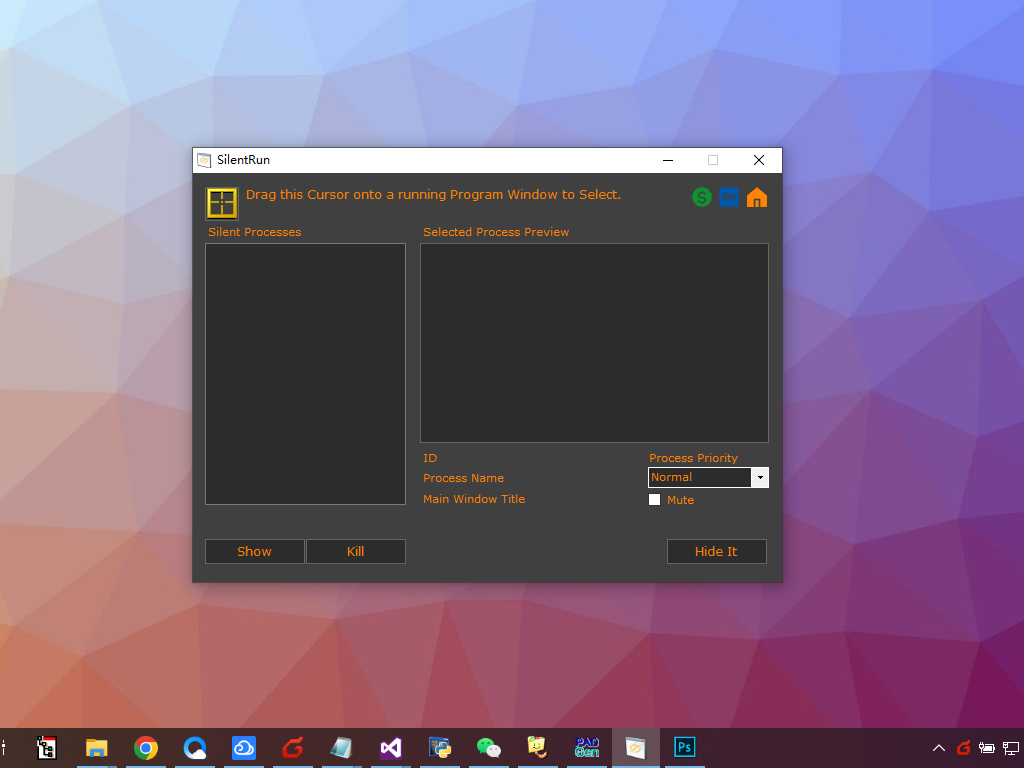
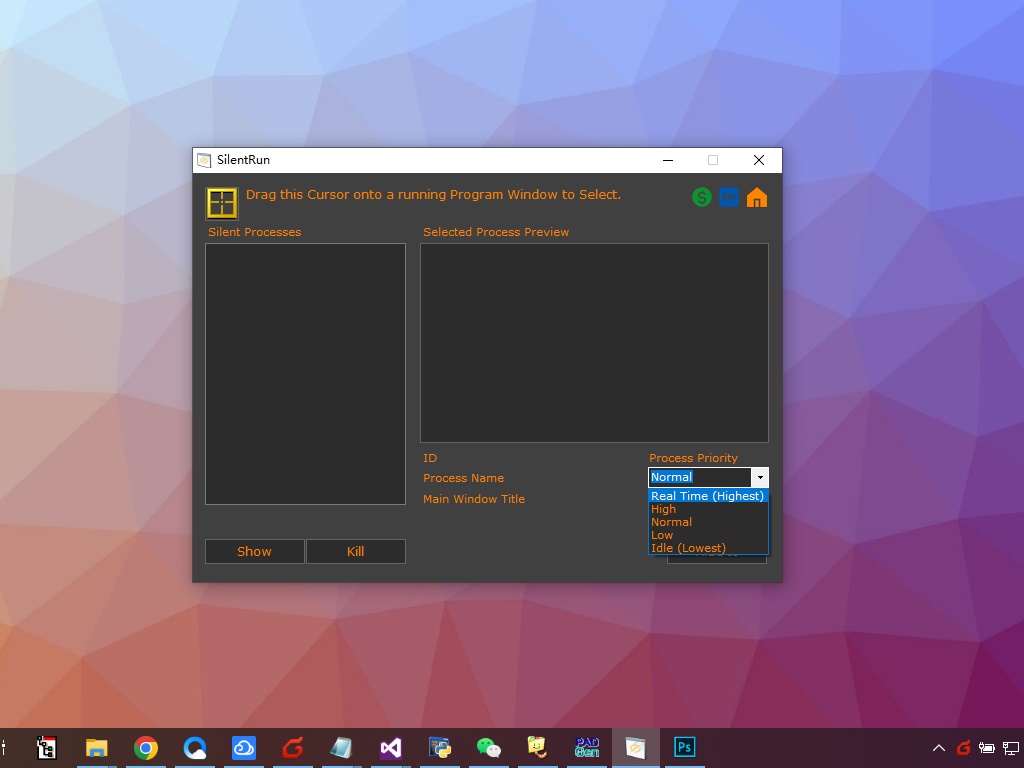
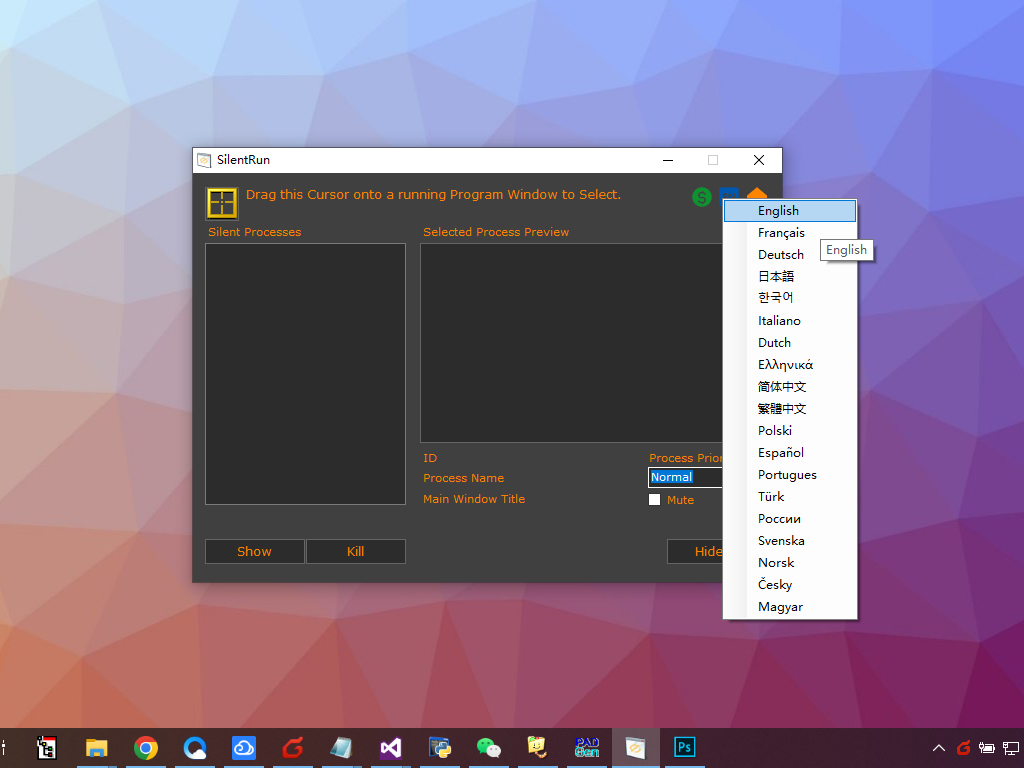
SilentRun è un piccolo e pratico strumento software di sistema Windows che consente di eseguire facilmente più programmi in modalità silenziosa in background. Può nascondere le finestre e le interfacce dei programmi e aumentare o diminuire la priorità dei processi in background. Per alcuni programmi con uscita audio, SilentRun può anche disattivare l'audio del programma e quindi eseguirlo silenziosamente in background. SilentRun ha un'interfaccia semplice ed è molto facile da usare. Per eseguire un programma silenziosamente, trascina semplicemente la casella di selezione nell'angolo in alto a sinistra della finestra SilentRun sulla barra del titolo o sulla finestra del programma che deve essere eseguito silenziosamente. Vedrai che il programma è selezionato da SilentRun e una miniatura del programma verrà visualizzata nell'area di anteprima. (Alcune applicazioni utilizzano la GUI non standard e questa potrebbe essere visualizzata come un quadrato nero pieno). Successivamente, puoi selezionare la priorità di esecuzione silenziosa in background (l'impostazione predefinita è la priorità Normale) nell'area di anteprima e impostare se disattivare l'audio in uscita e infine fare clic sul pulsante Nascondilo. È possibile ripetere i passaggi precedenti per consentire l'esecuzione silenziosa di più programmi in background.
The current text is the result of machine translation. You can help us improve it.
Requisiti di Sistema:
Windows 7/ 8/ 10/ 11 or later & Server (x32/x64)
Produttore:
AutoClose.netHomepage:
https://autoclose.net/silentrun.htmlDimensione File:
1.12 MB
Licence details:
Lifetime
Prezzo:
$19.95
Programmi correlati
PrintOnly è uno strumento software Windows che limita la stampa dei documenti solo tramite stampanti USB fisiche e non può essere visualizzato o modificato. Ciò impedisce efficacemente che il contenuto del documento venga modificato prima della stampa. PrintOnly supporta una varietà di formati di documenti, tra cui PDF, MS Word, Excel, immagini JPG/PNG/TIF, TXT, PowerPoint, RTF e altro ancora.
Crittografa facilmente più PDF in blocco. Una password per tutti i PDF o password univoca diversa per ogni PDF!
Un pratico strumento software Excel consente agli utenti di unire file, cartelle di lavoro e fogli di calcolo Excel XLS/XLSX e ODS/CSV/XML in un unico file o una cartella di lavoro. Non è richiesto alcun Office o MS Excel!

WAV To MP3 è un'applicazione di conversione WAV To MP3 desktop Windows per convertire velocemente e facilmente l'audio WAV nel formato MP3.
GIVEAWAY download basket

App gratis per iPhone »





App gratis per Android »




Commenti su SilentRun Pro 1.0
Please add a comment explaining the reason behind your vote.
Can someone explain why you would run any software silently?
Save | Cancel
I'd like to be enlightened too!
Save | Cancel
What would be a use case for this software? I can't see a need for it.
Save | Cancel
Automated Software Testing: In the realm of software testing, you might need to perform tests on applications without any user interference. This software can automate the testing process by running the application with predefined test cases in the background, making it suitable for regression testing and performance testing.
Legacy Software Compatibility: For organizations that rely on legacy software that doesn't run properly on modern systems, this software could force the legacy application to run silently in the background, allowing other modern software to interact with it through APIs.
Batch Processing: When you have a large number of files or data to process, a background application can help automate batch processing tasks, like converting file formats or processing data without a UI.
Server and Cloud Management: This type of software can be used to manage and monitor server applications or cloud services without any interruption to the end users. It ensures that these services keep running smoothly without human intervention.
Automated Data Extraction: Businesses that require web scraping, data extraction, or data synchronization might use such software to perform these tasks quietly in the background without user interaction.
Backup and Recovery: For data backup and recovery operations, a background application can ensure that data is regularly backed up without any interruptions, thus preventing data loss in the event of system failures.
Resource Optimization: The software can be used to optimize system resources by allocating them to specific tasks, services, or applications as needed without the user needing to make manual adjustments.
Silent Software Updates: In certain environments, like corporate networks, where users shouldn't be prompted for software updates, this software can silently update applications and operating systems in the background.
Data Security and Encryption: Security software might run silently in the background to monitor, encrypt, or protect sensitive data without user intervention, helping to safeguard information from unauthorized access.
Remote Administration: In IT support and system administration, this software can be used to remotely troubleshoot and manage computers and devices without disturbing the end user. It's particularly useful for helpdesk support and remote desktop management.
It's crucial to consider the ethical and legal aspects of using such software, as it could be misused for intrusive purposes. Privacy and consent of the end users must be taken into account. Additionally, the design and deployment of such software should adhere to applicable laws and regulations.
Save | Cancel
Interesting app... you can use its GUI, or use it via the command prompt [& scripts], and it remembers when you used it to hide an app, so you can close SilentRun Pro itself [the hidden app stays running], then reopen it to restore that hidden app's window. The fact that it can mute audio suggests that it's intended to hide games &/or video you don't want someone else to see without closing the game or app & signing out. It could be used to reduce clutter when you have multiple apps running, especially if you want the hidden app to continue processing whatever. You could probably also set up a script to start & then hide an app to monitor/log whatever every time someone logged into Windows -- those kinds of logging apps may show an icon on the Taskbar showing that it's running, which you may not want.
Installing SilentRun Pro just adds an uninstall key to the registry -- you can use the portable version if you want to avoid that -- while both the portable and regular versions use several .ini files to keep track off settings: Users\ [UserName]\ AppData\ Roaming\ silentrunoptions.ini, srexp.ini, srlan.ini, srsound.dll.
Save | Cancel