Italiano
Ogni giorno offriamo programmi GRATUITI che altrimenti dovresti comprare!
$35.00
SCADUTA
Giveaway of the day — Shadow Defender 1.4.0
Shadow Defender protegge il tuo PC/laptop contro attività maligne.
$35.00
SCADUTA
User Rating:
355
Lascia un commento
Shadow Defender 1.4.0 era disponibile come app gratuita il 28 dicembre 2015!
Oggi Giveaway of the Day
Strumento di condivisione di tastiera e mouse!
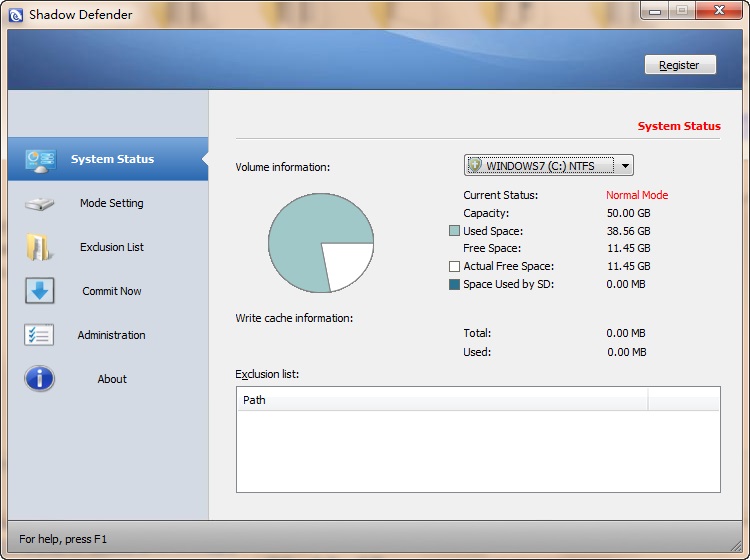
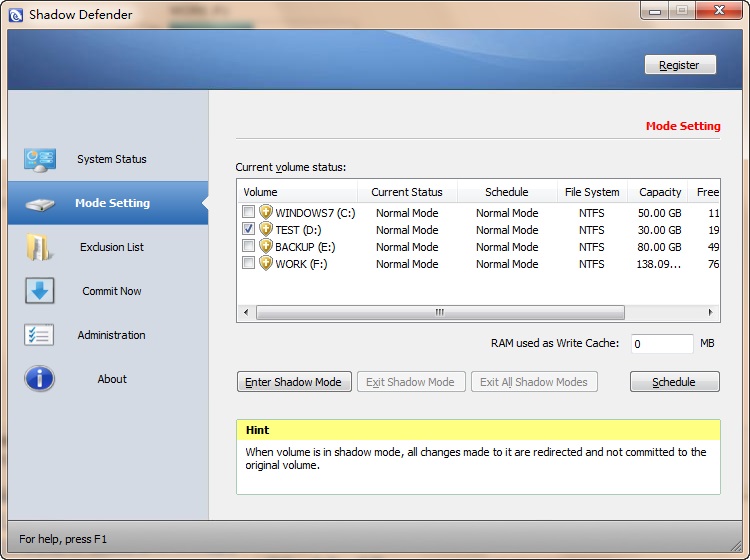

Shadow Defender è una soluzione di sicurezza facile da usare per i sistemi operativi di Windows, che protegge l'ambiente del tuo PC/laptop contro attività maligne e modifiche indesiderate.
Caratteristiche principali:
- Stati Ottimale - Configura il tuo sistema esattamente nel modo in cui desideri UNA VOLTA ed esegui in quello stato ottimale sempre. Non c'è bisogno di trascorrere tempo a rimuovere file indesiderati oppure con il trouble shooting e eliminando modifiche al PC indesiderati;
- Recupero del Sistema - Riduce il Costo Totale di Proprietà (CTP) per la gestione e il mantenimento dei tuoi PC semplicemente riavvolgendo i sistemi allo stato ottimale;
- Sicurezza del Sistema - Naviga in Internet senza traccia di cookies indesiderati, cronologia internet, file temporanei, applicazioni spam o spyware;
- Protezione Virus - Previene i tempi di inattività e danni al sistema dovuto a virus e diffusione di worm. Previene che i virus vengano scritti sul disco fisso;
- Cambiamento di Gestione - Massimizza il tempo di funzionamento cancellando immediatamente le modifiche al sistema accidentali o maligne.
The current text is the result of machine translation. You can help us improve it.
Requisiti di Sistema:
Windows XP/ 2003/ Vista/ 7/ 8/ 10 (x32/x64); CPU: Pentium 133 MHz or faster; RAM: 128 MB or above; SPACE: Hard drive space requirements are 3 MB for program files and 10M or more free space for each partiton in Shadow Mode
Produttore:
ShadowDefender.comHomepage:
http://www.shadowdefender.com/index.htmlDimensione File:
7.8 MB
Prezzo:
$35.00
GIVEAWAY download basket
Developed by Hewlett-Packard

Developed by Kaspersky Lab

The standard anti-malware solution for Windows.

Recover lost or forgotten passwords for RAR files.
App gratis per iPhone »

$0.99 ➞ gratis oggi

$0.99 ➞ gratis oggi

TOODL is a GPS‑based timer assistant that tells you the perfect moment to leave, no mental math needed.
$0.99 ➞ gratis oggi

$2.99 ➞ gratis oggi

$0.99 ➞ gratis oggi
App gratis per Android »

$11.99 ➞ gratis oggi

$0.99 ➞ gratis oggi

One of the best game to play in a groups of couples, friends, families and lovers.
$0.99 ➞ gratis oggi

$0.99 ➞ gratis oggi

Word mania is a game of words. It contains seven mini word games and over 7000 word puzzles to boost up your brain.
$6.49 ➞ gratis oggi
Commenti su Shadow Defender 1.4.0
Please add a comment explaining the reason behind your vote.
I have a license for Shadow Defender (SD) and have used it for many months. It does what it says very well. Let me clear up a few things I've found within the comments.
First of all, there are several other programs that do the same thing SD does. What it does is simply redirect all write requests on the 'shadowed' drive to a special file, meaning the actual drive doesn't get modified, and when you exit shadow mode that file is deleted and your system remains intact as it was before. There's really no overwhelming reason to choose SD over others that work just as well, like ToolWiz Time Freeze, Rollback RX, Deep Freeze or others. I chose it because I liked its simplicity.
Second, Shadow defender has no noticeable impact on system performance whether in shadow mode or not. You can run any app, game or whatever, but realize that if you have a drive in shadow mode, if your program writes to it, what it wrote will be gone when you exit shadow mode. It is possible to extract files from the shadowed volume if you need to however.
Third, if you want to test install a program and you want to do it in shadow mode but the program requires a reboot, just remember when you go into shadow mode to select the option to 'Enter Shadow Mode on Boot'. SD's default is to exit shadow mode on reboot, but you don't have to leave it that way. Also bear in mind that ALL programs that SAY they need you to reboot don't really need it. You can always try running the installed program without rebooting; the worst that can happen is you get a message saying the program can't run until you reboot!
Fourth, SD differs from SandboxIE and similar programs in that sand-boxing programs run specific programs in a 'sandbox' and doesn't allow them to modify your drives or Windows registry. To exit the sandbox you just close the program. Programs like SD in effect 'sand-box' your whole computer so that ANY program, including Windows itself, is not able to permanently modify the contents of the shadowed drive(s). Programs of this type usually require a reboot in order to exit the protected mode.
I think SD is one of the better of these kinds of programs, in that it doesn't require a reboot to ENTER its protected mode like some others do, and it doesn't affect overall system performance to a noticeable degree or lengthen reboot time (like Rollback RX does). It's interface is simple and functionality is straightforward. I suggest you take an image of your system, then give it, and some others if you like, a try.
Save | Cancel
Tested on a dual boot Windows 10 and Windows 7 (x64).
I have a problem which I have been unable to resolve when dual booting, as I have the documents folder shared between both systems, and when I use MS 2010 Outlook when booted into Windows 10, it corrupts the .pst files in Outlook email, and when I boot back into my main OS, Windows 7, I have to restore the Outlook files.
I installed this GOTD on to Windows 10, WARNING here, by default it starts on booting, so disable this when you first install until you are sure what you are actually doing, also disable auto update as I would assume this will invalidate your installed copy as it is restricted to "as is". All this is done under the "administration" tab.
I shadowed all drives except the one with Windows 10 installed, as auto updates is the default on Windows 10, and the help information for Shadow Defender specifically warns you NOT to update your OS whilst Shadow defender is running, which makes it pretty useless for Windows 10 as it seems to update when it like.
Anyway, installed on Windows 10 and running to protect all drives except windows 10 drive, it does work, only problem I found was that when I booted back into Windows 7, it detected "another" installed software had interfered with a drive, and checked it and "fixed" it, but all seems OK.
Bottom line is, it does work on dual boot, but with caveats, so care is needed. Do though use the administration tab to set it up.
I will keep it installed but only for occasional use when I am trying to debug the problem I have with shared files with Windows 7 being corrupted by Windows 10.
Hope all this makes sense.
Brian
Save | Cancel
I have a lifetime license of this software but I almost doesn't use it anymore.
The reason is because you just can't test any software which needs a reboot because at this moment your computer will revert back to its previous state and you will just not be able to test this software.
Because you have no mean to know in advance which software will need a reboot and which software will not need one, you are simply better to test the new softwares on a second OS which will serve only for testing.
All you have to do is to reboot your computer and to enter in your testing OS for testing a new software. This is a little bit less secure than Shadow Defender but if your testing OS get corrupted you just have to reboot your computer, enter in your regular OS and reinstall an old incorrupt image of your testing OS.
This way of doing is completely free : you just have to use a software like EasyBCD to manage your dual boot.
If Shadow Defender would have the capacity to stay in a shadow mode after the reboot and preserving what would have been installed in a previous shadow mode (the one in which you were before the reboot), like "Try and Decide" of Acronis is able of, I would surely use again Shadow Defender but until this moment, the use of Shadow Defender is a loss of time for me.
Save | Cancel
That link to the review on Softpedia is corrupt. It brings up some nonsense about a Surly Toolbar ... not willing to click on any link on a page like that.
Save | Cancel
Karl used these types of tools to give us his extensive tests of GAOTD offerings. Here's what he said one time (I save stuff like that in another GAOTD, AllMyNotes):
"No, reboot isn’t a utility. I run my system with a virtualisation software. Like ShadowDefender (GOATD June 2013) or Toolwiz Timefreeze (included in Toolwiz Care – recommended!) or DeepFreeze (paid – IMHO the best).
Every installation is done under a virtualized system. That means, the installation does never affect the REAL system. To remove all changes, ever made to the system, you simply “reboot” the system.
Therefor I can easily test software, without ever harming my real default installation. Should be used by everybody. HTH.
Comment by Karl — January 29th, 2014 at 8:23 am"
Save | Cancel