Ogni giorno offriamo programmi GRATUITI che altrimenti dovresti comprare!
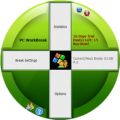
Giveaway of the day — PC WorkBreak 1.13
PC WorkBreak 1.13 era disponibile come app gratuita il 10 giugno 2015!

Riducete il rischio di RSI (Disturbo degli arti superiori da lavoro) grazie a WorkBreak. Questo programma mostra dei promemoria che invitano l'utente a fare delle brevi pause dal lavoro al computer, a svolgere esercizi per occhi e piedi e altro ancora per restare in forma. Se si soffre di dolori al corpo dovuti all'uso prolungato del computer, questo software aiuta a impostare le giuste pause per evitarne il peggioramento. Tutte le impostazioni di interruzione sono configurabili e forniscono immagini e animazioni insieme ai promemoria.
Caratteristiche principali:
Impostazioni per le pause molto flessibili;
Demo degli esercizi da compiere;
Statistiche aggiornate delle pause;
Supporto unicode;
Novità: aggiunta la lingua spagnola (Messico);
Novità: ottimizzata l'interfaccia in polacco;
Novità: Ottimizzati i testi in italiano e polacco.
Nota bene: il software include un 1 anno di aggiornamenti gratuiti. Oggi gli utenti di GOTD possono acquistare una licenza singola (1 PC) o una licenza personale (3 PC) con aggiornamenti a vita di PC WorkBreak con il 50% di sconto.
The current text is the result of machine translation. You can help us improve it.
Requisiti di Sistema:
Windows 2000/ XP/ Vista/ 7/ 8 (x32/x64); .NET 2.0 or later
Produttore:
TriSun Software LimitedHomepage:
http://www.trisunsoft.com/pc-work-break/Dimensione File:
9.5 MB
Prezzo:
$19.99
Programmi correlati

Trova rapidamente i file duplicati sul vostro hard disk in base al loro contenuto. Utilizzandolo, è possibile rimuovere i file indesiderati e recuperare spazio su disco riducendo così i costi di gestione ed evitando inutile confusione.

Controlla e verifica se gli indirizzi di posta elettronica sono validi (formato oesintassi) e realmente esistenti sui corrispondenti server di posta. Ideale per mantenere un elenco email pulito.
Un calcolatore di date e orari molto completo, calcola i giorni che passano da una data all'altra e molto altro ancora.

PDF to X è usato per convertire documenti PDF in Word (. doc) / WordPad (. rtf), pagine web HTML, JPG / PNG / BMP / TIF / GIF / PCX / TGA e file di testo in modalità batch. Funziona senza Adobe Acrobat o Adobe Reader ed ha un'interfaccia utente molto facile da usare. Capacità di conversione precisa e veloce.

Progettato per inviare auguri di compleanno e cartoline di saluti automaticamente, basta impostarlo e fa tutto da solo.
GIVEAWAY download basket




App gratis per iPhone »





App gratis per Android »





Commenti su PC WorkBreak 1.13
Please add a comment explaining the reason behind your vote.
Installed and registered without problems on a Win 8.1.3 Pro 64 bit system. It installs in my case into the user/xxx/appdata/roaming/ directory. Not the best place to store the program itself.
A (Chinese?) company without name and address and software from many areas:
"TriSun Software Inc. (TSSI) is committed to provide professional and useful software, we have engaged in English software development and sales since 2001. As the company grows, we will provide you with more professional and stronger software products. "
A funny interface opens. One of the unusual - something different. Why not?
In the options you can define language, path, time and startup place. When changing the language, the program should not take the system default values for the day names.
http://i.imgur.com/3Z0SISM.png
You define a break, could be "eye exercise" or a "walk", define the length and the time and this little program wakes you up from your daily work you to take a break.
Nothing bad about this.
Hmmm, when the time to break comes, this program locks the keyboard - with some side effects. I could not take a screenshot, due to the locked keyboard. You have to cancel the break to gain again access to your computer.
Every program is helpful, which tells you to do something different. It could be a clock, it could be a Windows build in remainder, it could be your kid, cat, dog at home. I am afraid, that this little program will not be the big hit.
Take a look!
Uninstalled via reboot
Save | Cancel
@Karl
I think I need to explain "the day names do not change when change the language":
The day names are relied on your system settings.
If you use Spain system, the day names display in Spain, etc.
That is, the users will see the day names in their native language.
So, we think it is better than rudely changing them to the unreadable strings. Such as a normal Japanese user changed the language to Polish, she/he will see some unreadable strings, this is a big confused for him/her.
Also, "locks the keyboard".
Yes, this is PCWB's design, the break settings are made by yourself, you should follow them as far as possible. So, PCWB do not allow you continue to work, if you have a more important thing, just it.
Hope this helps.
Nosa@TSSI
Save | Cancel
@Karl
Thanks for your reply.
I understood that. I said "Very sorry", just for your test, review and time, because you uninstalled it, so, we wasted your time.
Say sorry for this again.
About the day names, your opinion is also good in some cases, we will consider it again, and make it finer:
Such as, determine the OS language first, if it's not English (indicate that this use can fully read the day names that provides by his/her OS), then keep the day names with OS settings.
If OS language is English, then change the day names when user changed the language in PCWB.
Thanks again.
Nosa@TSSI
Save | Cancel
@Karl
Thanks for your test and review.
It looks like you do not like it, we're very sorry for this, and thanks for your time.
Nosa@TSSI
Save | Cancel
Hello everyone,
To know all our software products, please visit our homepage at
http://www.trisunsoft.com/
And you can find other 5 sites on the bottom of this page. Just visit them to know more detail if you are interested in them.
Thank you.
Save | Cancel