Ogni giorno offriamo programmi GRATUITI che altrimenti dovresti comprare!
Giveaway of the day — Leawo PowerPoint to DVD Pro
Leawo PowerPoint to DVD Pro era disponibile come app gratuita il 10 aprile 2011!

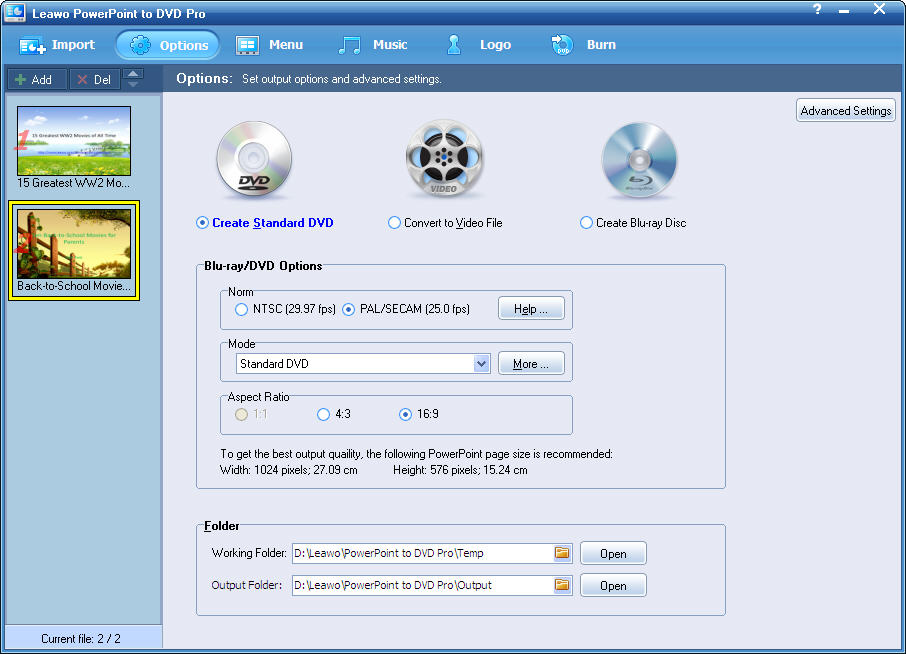
Leawo PowerPoint to DVD Pro è un pratico convertitore in grado di convertire i file di Microsoft PowerPoint in DVD, Blu-ray e tutti i più popolari formati di file video, come MP4, AVI, FLV, ecc. Con esso, potrete condividere facilmente le vostre presentazioni e slideshow su lettori DVD/Blu-ray, TV, siti di video sharing come YouTube o dispositivi mobili come iPad, iPhone, iPod, PSP, ecc.
Funzionalità principali:
- Supporta la conversione in modalità batch;
- Registra narrazioni per i DVD, i Blu-ray e i video di output;
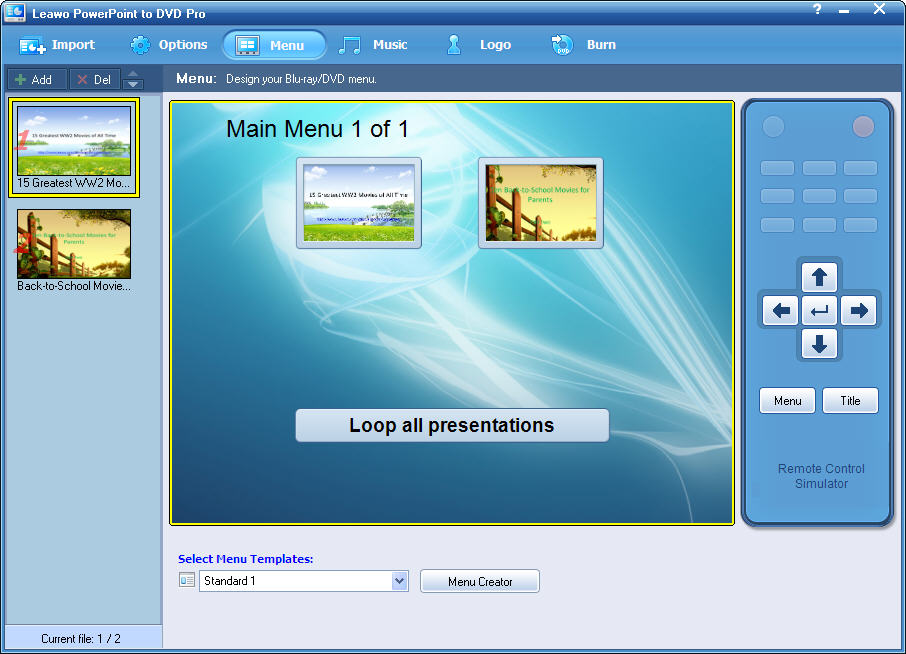
- Permette di navigare fra i contenuti con delicati menu per DVD/Blu-ray;
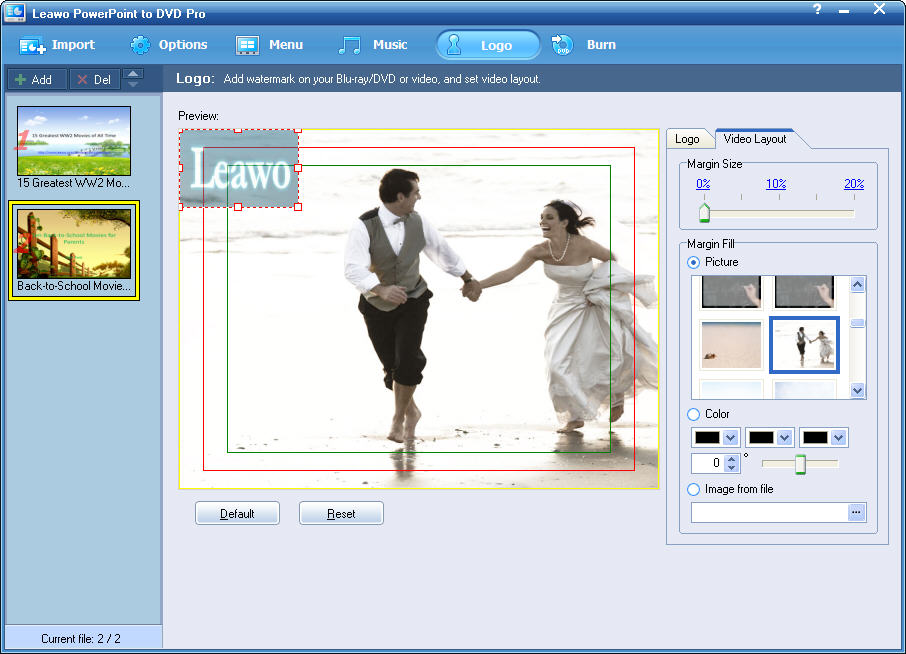
- Salvaguarda i diritti delle presentazioni con dei loghi;
- Mantiene animazioni, effetti di transizione, video e suoni dei file PPT originali.
The current text is the result of machine translation. You can help us improve it.
Requisiti di Sistema:
Windows XP/ Vista/ 7
Produttore:
Leawo SoftwareHomepage:
http://www.leawo.com/powerpoint-to-dvd/Dimensione File:
24.1 MB
Prezzo:
$79.95
Programmi correlati

Caricate qualsiasi video relativo ai giochi (online o real-life) sulla pagina Facebook di Leawo e fatelo votare da tutti i nostri fan. I 10 video con più “Mi Piace” saranno eletti vincitori e i loro creatori saranno premiati con cifre comprese fra 29.95 e 99.95$!
Leawo PowerPoint to Video Pro è disegnato per convertire presentazioni di PowerPoint e slideshow in tutti i tipi di video condivisibili sui siti di video sharing come YouTube, piattaforme come OS Apple o dispositivi mobili come iPad, iPhone, iPod, PSP, ecc.
Leawo Total Media Converter Ultimate è una soluzione multimediale 7-in-1 perfetta per convertire audio, video normali/HD in tutti i formati più popolari, rippare e masterizzare Blu-ray e DVD video, scaricare video online e copiarli su hard disk o player portatili.
Leawo DVD Ripper converte i film in DVD in file video AVI, MP4, 3GP, MOV, ecc. Inoltre, consente di modificare i video ed ottimizzarli per la distribuzione su Internet, player portatili e molto altro.
GIVEAWAY download basket




Commenti su Leawo PowerPoint to DVD Pro
Please add a comment explaining the reason behind your vote.

Downloaded and install fine on windows 7 64, however when I try to load/add a power point file, it says power point is not installed on this computer. I have had power pint on this computer for years, My version is 2007 and is up to date. I can use it just fine by itself. How can I get this program to recognize my power point files? Any help will be welcome, Thanks!

System Requirements (according to developer website):
Microsoft PowerPoint Version: 2000/2002/2003/2007/2010
Operating System: Windows 2000/XP/Vista/Win 7
Processor Type: Pentium (500Hz) or above
RAM Capacity: 256MB at least
Available Disk Space: 2GB or larger free space
Additional: DirectX 8.1 or above; DVD writer; Windows-compatible sound card
I thought this would be useful for these of us who are wondering whether this application does require PowerPoint to be installed on the system... Well, it does!
So my first suggestion to the developer is: Please release a version that independently from PowerPoint would just convert the presentation without having to interact with the Office components during conversion.
Thanks to GOTD and developer and happy weekend to everybody.
To function the way ppt2dvd does, you will be needing two different kind of things:
1. something that PPT cannot, like export a presentation to a movie file (PPT 2010 can do that: http://bit.ly/dV6myR ).
2. interpreting the stuff in a PPT-file.
The second point is something PPT can do excellently (one of the things it is made for). PPT gives the standard possibility to 'talk' to it's components. This is called an api-call.
Developers of PPT2DVD did use this feature and only had to develop something for the first point and do the api-call talking to PPT.
This way they did not have to program all the needed interpreting functions in PPT but rather use them by (api-)calling them. This is why you need PPT installed, because it's functions are used.
To ask for a standalone program means you're invinting the programmers to code lots of PPT code that is already present in PPT. Ofcourse they could do that, but it would make the product very much more expensive. A significant less amount of people would pay such an amount for this software.
There is only a small market for the people using this (a few buyers must return all investments). Being very expensive would place the product out of the market (only few people need it). Nobody would be left to buy it. Still, the developer needs to earn his living. Guess you will not see a standalone version this lifetime.
Open Office ca do pretty much the same as PPT can do, but internally it is based on a different coding. It is like a Chinese and an Arab could both be able to write down a recipe to cook potatoes. The dish will be the same but the instructions where different.
This is why api-calling Open Office will not work, it does not understand the api-language of PPT.
Of course the developers could build an alternative to do the same with Open Office.
When people choose between Open Office and PPT there is a huge diffence, because Open office is for free and PPT is a commercial product costing you money.
Just because Open Office is free doesn't mean that the developer has to make his product for free aswell. Like said before, he might be needing to earn a living, like most peole do.
What kind of people are more likely to pay for this add-on, PPT buyers or Open Ofice users (without valuing the different groups in any negative way)?
That is why the developer did not invest his time and money in an add-on for Open Office (users are les prone to buy).
So "YES", you do need PPT.
And "NO", you cannot use PPT2DVD standalone and probably will never be able to do that in the future.
And "NO" again, you cannot use PPT2DVD with Open Office and probably will never be able to do that in the future.
This is it! It really works fine though. I'm very happy with it (using PPT 2007). From PPT 2010 and further this produkt is out of business (A good reason to give it away now or change it into freeware later).
I guess this is not what you like to read, so I kindly ask to vote for me in any way you see fit. It is really your call and I will duefully ignore that :lol:
Downloaded and installed without a problem. Easy to register. The program has a neat, professional-looking interface. I ran the program and converted a simple 25-slide PowerPoint project to an AVI file (couldn't justify wasting a DVD on a test). There was a popup warning about using FFDSHOW.EXE during the conversion but I "allowed it this once" (one of the options). The conversion took several minutes and the resulting 640x480 AVI file was nice looking and about 3x the size of the original file. I have PowerPoint 2007 installed and the program never warned/stated that PowerPoint wasn't installed. The program provides "Help" menu item complete with screen shots and clear explanations including "Getting Started" and "Set Options" and FAQs. Good job. Thumbs up.
Leawo PowerPoint to DVD Pro does a screen capture of your playing PowerPoint file, then outputs a video file, DVD or Blu-Ray layout, ISO, or [using StarBurn] burns video DVD/Blu-Ray to disc. Think of it as a specialized Slideshow to DVD app. Looking at a test DVD layout with PgcEdit, the DVD seemed slightly off based on the way it was scripted or laid out, the stereo AC3 audio bit rate also was a bit high, & the mpg2 video was encoded with somewhat unusual settings, but as far as I can tell it should play OK in most players. While it played OK in software players, the Blu-Ray output was a bit more questionable... To get a better look at the video itself I tried using HdBrStreamExtractor, a GUI for eac3to.exe -- eac3to is pretty much the standard for demuxing a Blu-Ray's .m2ts audio/video files, & it wouldn't work on the test Blu-Ray output, meaning something's missing or off. And FWIW, the video didn't pass Sony's DVDA Blu-Ray compliance testing... compliance testing is a set of stricter standards or specs used by some Blu-Ray authoring apps [e.g. Sony, Roxio/Sonic etc.] as well as facilities for Blu-Ray production/replication. Some Blu-Ray players are picky about what they'll play, especially on a burned disc, so between the failed compliance testing & eac3to not working I'd suggest extra testing &/or hedging your bets with any Blu-Rays created with Leawo PowerPoint to DVD Pro. Menu creation/customization in Leawo PowerPoint to DVD Pro isn't bad, but it's not on a par with basic consumer or home level apps from Roxio, Nero etc.
Besides a Flash Player Installer [v. 10.2.53.64] today's GOTD includes older versions of Xvid, DVD Author, Microsoft C++ runtimes, & adds/registers Mpeg2DecFilter.ax... Mpeg2DecFilter.ax can cause problems -- search the Windows folder for it & try a file rename or delete if you have media handling problems after installing Leawo PowerPoint to DVD Pro. Xvid files can be updated/reinstalled as necessary -- I'm not sure how much difference it would make copying current DVD Author files into the app's DVDAuthor folder [DVD Author is a well known *nix app http://goo.gl/HDEN1 so you'd have to copy Windows files from something else like DVDStyler, which includes current versions]. The Media Player Classic - Home Cinema site on sourceforge has filter collections for download that include Mpeg2DecFilter.ax if you wanted to try a current version -- note that you'd most likely want the 32 bit download here: http://goo.gl/xwhHl . FWIW it seems to run fine *for me* in win7 64 with the latest Xvid installed, without adding the included C++ runtime, & without the included Mpeg2DecFilter.ax, but I do have plenty of C++ runtimes, video decoders etc. Leawo PowerPoint to DVD Pro itself doesn't appear to need or use Windows' registry, adding an uninstall key during setup, but I recorded ~300 new registry entries due to the Xvid, C++, & .ax file installations. The C++ runtime install adds several files under Windows\WinSxS as usual, & 2 Xvid files join Mpeg2DecFilter.ax, getting added to the system folder. Several folders get added to User Application Data or User App Data Roaming, with one more added to All Users Application Data or Program Data [XP vs. win7]. The app itself takes up ~61 MB in 463 files, 42 folders.
There are plenty of DVD authoring apps, there are plenty of screen capture apps [both still & video], but using Google there only seems to be a few that combine the 2 for PowerPoint presentations -- Leawo PowerPoint to DVD Pro is one of them. It could be that all the established names in the video software biz are late to the game, or it could be a few companies trying to create a niche market -- I personally suspect the latter, but that's me. I don't know that there's all that much demand for presentations on DVD or Blu-Ray when you can carry the original content on a USB stick, optionally carry a tiny projector in your pocket, &/or have it on-line. The Video DVD format ties your hands when it comes to being highly interactive & limits your display resolution to Standard TV. Blu-Ray handles the high resolution, but if you want too much more than start/stop buttons that means either 1) learning Java, 2) paying thousands for software, or 3) hiring someone who has already done 1 & 2. That said, it's not terribly difficult to take a more DIY approach, capturing stills &/or video from a presentation, however it's been created. Then just import that into your DVD &/or Blu-Ray authoring &/or slideshow app, optionally making a stop along the way in a video editor to lay things out & maybe add FX &/or transitions [the free Lightworks video editor may still be in Beta but it seems to be coming along nicely].
App gratis per iPhone »





App gratis per Android »





Credo che ci siano anch freeware di questo genere, ed credo che per Open Office esiste un app freeware (open office = gratis programma simile ad Microsoft Office ).
Allora come capisc....o io per fare un video si puo mandare il file di questo Powerpoint ad essere in file di dvd. Ma se e´un file di dvd.....lo puoi mandare at altri file come flash per esempio. Quello che non so e´se si puo´fare viceversa !!!!! ??, qualcuno lo´sa... ?? Buona giornata, adesso vado ad vedere le Features...
Save | Cancel