Ogni giorno offriamo programmi GRATUITI che altrimenti dovresti comprare!
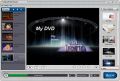
Giveaway of the day — Daniusoft DVD Creator
Daniusoft DVD Creator era disponibile come app gratuita il 17 luglio 2010!
Masterizzate i vostri preziosissimi DVD, arricchiteli con bellissimi menu e condivideteli con i vostri amici e la vostra famiglia.
Daniusoft DVD Creator vi offrirà la strada più semplice e veloce da percorrere masterizzare video come AVI, WMV, MP4, MKV, MOV, FLV, ASF, MOD, VOB e MPEG su DVD, riprodurli sulla maggior parte dei lettori DVD e crearne delle copie di sicurezza sotto forma di file ISO o cartelle DVD. Il programma supporta i video in HD, così come gli AVCHD (MTS/M2TS), TS, TRP e MOV HD. Inoltre, potrete creare dei bellissimi menu personalizzati per i vostri DVD sfruttando dei temi preconfezionati, assegnare ai DVD i nomi che desiderate, creare dei capitoli per passare da un punto all'altro dei film e personalizzare le anteprime presenti nei menu.
Create bellissimi DVD con Daniusoft DVD Creator:
- Masterizza video in AVI, WMV, MP4, MOV, MPEG, VOB e FLV su DVD
- Support i video in HD, compresi MTS, M2TS, TS, TRP, H.264, ecc.
- Effettua il backup dei video sotto forma di file ISO o cartelle DVD
- Fornisce una vasta gamma di template per i menu dei DVD menu per creare dei menu impareggiabili
- Crea menu personalizzati per i DVD completi di immagini di sfondo e musiche di sottofondo
- Crea capitoli per i DVD e anteprime per i titoli utili a passare comodamente da un punto all'altro dei film
- Facile da usare, bastano pochi click per completare la creazione di un DVD
Maggiori dettagli su http://www.daniusoft.com/dvd-creator.html
The current text is the result of machine translation. You can help us improve it.
Requisiti di Sistema:
Windows XP, Vista, and Windows 7
Produttore:
DaniusoftHomepage:
http://www.daniusoft.com/dvd-creator.htmlDimensione File:
28.7 MB
Prezzo:
$25.00
Programmi correlati
Daniusoft Video Converter Ultimate è un potente convertitore che rimuove i DRM, rippa i DVD, converte i principali file video e audio tra loro, masterizza DVD e trasferisce i video di YouTube su dispositivi mobili come iPod, iPhone, iPad, ecc..
Daniusoft DVD Ripper è il miglior software per il DVD Ripping attualmente in commercio. Vi aiuterà a convertire DVD in popolari formati di file audio e video, come MP4, AVI, WMV, MPEG, FLV, 3GP, MP3, M4A, AC3, WMA, e trasferire questi ultimi su dispositivi come iPod, iPhone 4, iPad, PSP, ecc..
Daniusoft DRM Converter è un software professionale per la rimozione dei DRM da file WMV, WMA, M4P, M4V, M4A, M4B e ASF e un efficiente convertitore che permette di convertire tra loro tutti i più popolari formati di file audio e video, anche quelli in HD.
Daniusoft iTransfer è un vero must-have per tutti gli utenti di iPod/iPhone/iPad che vogliono gestire film, foto e musica contenuti su iPod/iPhone/iPad, PC e iTunes e convertire file video o audio in elementi compatibili con iPod/iPhone/iPad.
GIVEAWAY download basket




Commenti su Daniusoft DVD Creator
Please add a comment explaining the reason behind your vote.

The Good
* Straightforward and easy to use.
* Supports many input video formats.
* Allows users to burn videos directly to disk, create ISO, create DVD folder, or all three.
* Has the ability to automatically create chapters.
* Allows users to preview what the DVD will look like after it has been created.
* Supports DVD-5 and DVD-9.
* Users can select from a handful of DVD menu templates, and can download some more.
* Allows users to automatically shutdown computer after processing has finished.
The Bad
* Needs improvement in output quality.
* No features to customize audio or add subtitles.
Free Alternatives
DVD Flick
WinX DVD Author
For final verdict, recommendations, and full review please click here.

DVDs are complicated, & it's Extremely difficult to create DVD authoring software that's powerful [i.e. lots of features], flexible [i.e. you can customize everything], & easy to use... to my knowledge no one has succeeded in or with all 3, & I'm including software that costs several hundreds of dollars. Daniusoft looks like it's off to a promising start, but while Daniusoft DVD Creator is very usable, the interface needs work -- it's simply not intuitive. Personally I think some of that could be fixed by simply adding more menu &/or buttons to the main GUI window, but long story short, right now I can't see any compelling reasons anyone would want to use today's GOTD instead of the extensive competition.
You can get a good overview of what's available at videohelp.com -- I'm partial to Sony [they do have some decent bargains when a chain like Fry's has their apps on sale] but that's me, & there are several low-mid price range alternatives like apps from TMPGEnc that are quite popular. A couple of times Cyberlink has been giving away the older version of its DVD suite [includes PowerDVD], & Roxio has been running sales [$50 + MIR] on their Creator 2010 package which includes Sonic MyDVD & Videowave [Sonic is a Big name in DVD authoring]. While not the easiest app I've ever used, the free multiAVCHD does DVD, AVCHD, & Blur Ray. And while the app itself is a bit feature limited, the free DVDStyler is available in a portable version [portableapps.com].
On to Daniusoft DVD Creator itself, the app only need a couple of registry entries in the Daniusoft keys. It weighs in at ~57MB with 253 files, 31 folders. It includes the MainConcept mpg2 encoder which is a plus [that's what both Adobe & Sony use]. It has one small oversight/error, in that when in the settings menu, clicking the Help button next to the video std you'll be using [NTSC/PAL] brings up a country list --> select USA & it sets the std to PAL, which it shouldn't.
When you start Daniusoft DVD Creator you drag/drop or import your video in the left pane where Title clips are listed -- note that title video files/clips need to include audio [you really should be able to import title audio/video separately, but you can't]. Once you have at least one title clip in the list, right click the menu background or click the light-looking button on the left under the menu preview and you can change the background picture/video & import audio to go with it... you can import a still, video, or use a frame from a video file. Video DVDs are all mpg2, & in the end whatever you set up for the menu pages will be encoded to mpg2 video... if you want to use motion background(s), it makes sense to import less compressed avi files then since they're going to be re-encoded anyway, & that'll give you less quality loss.
Once you have your background in place [or use one of the templates], you can drag menu elements around, including *off the screen* to get rid of those you don't want... text for buttons & the title is editable once selected. Clicking the Map bar on the right of the program window shows you what you've added so far to your DVD -- you'll initially see your menu with video below it, & clicking video brings up the title menu page, which can be customized the same way as the main menu you just did -- from here you can add chapters to your video [right click or use the right button in the left-hand group under the preview window]. The preview button to the far right gives you an idea of what everything should look like & how it should work.
What to look for in a DVD authoring app.
1) You want to be able to customize your menu backgrounds, & you should ideally be able to design & place your own buttons, plus the highlights that show up when you select a button with the remote.
2) You should be able to create as many menus as you want [within spec limits], & control how they're laid out, very similar to the way you design a simple web site. Included in this, you should be able to set what plays 1st, for an intro video for example. And you should be able to set which buttons on the remote will work in each part of your DVD.
3) Ideally you should be able to include more than one audio track [even if multiple languages aren't needed, you may need to use stereo & 5.1 -- many PC software players don't handle 5.1], & subtitles are always good [you can add them later, but it's work]
4) While there are lots of features like *Stories* that can be nice, 2 of the most useful for the average home user IMHO are the ability to skip over parts of the video [without re-encoding], & play lists, which allow you to chain together several individual clips/titles... both can be nice for example if you use recorded TV shows or put together a version for children [without having 2 separate DVDs].
#42: "... If it wasn’t for the issue of a two hour movie file not being able to fit on a standard blank DVD..."
In case it helps anyone...
The size of a DVD mpg2 video file depends on frame rate, length, & amount of compression [controlled by setting the bit rate during/for mpeg2 encoding]. Audio bit rate & number of channels [2 vs.5.1] effects the size of that portion of the VOB files where DVDs store their audio/video/subs, though the audio bit rate is *usually* set to common practice standards by default in most all AC3 encoders. Players may/may not play non-std AC3 bit rates.
Though the peak DVD mpg2 bit rate is 9.5, using 9 is safer for all software & all players. The minimum bit rate is usually something very low around .120, & the average bit rate is what you most often alter to fit your video -- usually between 5 & 6, though you can go as low as 4.5 without things looking too obviously sub-par, & there's nothing that says you can't use 8 or 9... the higher the bit rate, the less compression, the higher the quality, the bigger the file. Around 6 will put the average 1.5 hr. video on a single-sided DVD. Around 4.5 will let you get around 2 hr. Any more than 2 hr, or if/when quality's important, use dual layer for anything over 1.45 hr. It's best when/if possible to encode your mpg2 video titles outside of any DVD authoring app, which should [if it's a good app] use the video as is, without re-encoding -- this is because DVD authoring apps normally focus on making DVDs, not encoding, & an encoder is included mainly because you need to encode your menus, complete with any button & title artwork to mpg2. There are of course exceptions, but that's the general rule of thumb. Because mpg2 is normally written to disk as it's encoded, you can usually get the current size of the file in Windows Explorer after hitting refresh. If you want to know if your compression is on track to fit your video on DVD, hit View -> Refresh just as the encoder says it's reached 5% [or whatever %]... plug that figure into Calculator, divide by 5 [or whatever %] & multiply by 100. If you really want to maximize your use of space, aim for slightly over capacity & use DVD Shrink, which will reduce it right to the limit -- as long as Shrink shows the new file will be within 90% or more, no one should notice. Where you use NTSC [North America etc], you can get reduce file size & time to encode by using a lower frame rate [fps]...
Film is shot at 24 fps, Many retail Blu Ray discs use it, & many camcorders let you use it too... many prefer the *Film Look*. But, NTSC is 29.976 fps. To make mpg2 24 [actually 23.976] work for DVDs [Blu Ray players work with 24 just fine] they add pulldown, which is basically instructions to repeat certain frames to get 29.976, which is what the file will say it is, & what it will play at. Encoding at 23.976 or 24, applying pulldown during encoding, your file will encode faster & take up less space. Often a video source or recording can have the extra, *repeating* frames removed [it's called Inverse Telecine or IVT for short].
The program isn't the greatest, but does convert and burn directly to DVD which is the only benefit I would say.
Wondershare is the owner of the domain for digitalsignatures and is in China. They also have the exact same program under a diff name.
This program is easy to use but doesn't have to many options than to just convert, choose your background which would include a custom pic and music, and...that's it.
If you make any changes after selecting your customization....ie screen size....you will lose all of your customization and have to start again.
The program froze a couple of times but didn't crash.
If you have best performance selected you probably won't be able to burn a movie to disk because it will not resize the movie or change the quality to fit the profile. I can only use standard and high quality.
I can't comment on the quality yet because it is still working....but my post probably will be deleted again so I just wasted more time :P
Not quite plain sailing today.
Activated and installed, as per the readme file, but the app doesn't show as registered [as far as I can see, anyway].
Under Help/Register, I am asked for Licensed e-mail and Registration code?
Confusing.
App gratis per iPhone »





App gratis per Android »




x Giovi:
Se intendi per BARBATRUCCO piratare Nero allora stai commettendo
un illecito e sei passibile di denuncia alla GDF.
Save | Cancel
Ma perché quando carico un video è di 5 giga???????????????????
Save | Cancel
Hi ALL!!
SPECIAL ONE Super NUMBER ONE here!!!
Come siempre vado di fretta (il dovere mi chiama....che ce posso fà?? LOL!!).
Direi un TOOL, quello di oggi, che per voi va benissimo mentre per me, che sono SPECIAL ONE, sfiora appena la sufficienza.
In effetti per 29 MB mi aspettavo di più, soprattutto per la qualità dell'output non eccelsa (ma i gusti dello SPECIAL ONE sono particolari...quindi per voi potrebbe anche andar bene....LOL!!).
Inoltre non ci sono features per personalizzare gli audio tracks o per aggiungere i sottotitoli al DVD creato.
Insomma buono per dilettanti allo sbaraglio come voi...LOL!!
Io preferisco tenermi NERO (FREE per me of course con un BARBATRUCCO che voi vi potete solo sognare la notte...LOL!!) e/o il freeware DVD FLICK a mio parere superiore a questo GAOTD:
http://www.softpedia.com/get/Multimedia/Video/Encoders-Converter-DIVX-Related/DVD-Flick.shtml
Ora devo proprio andare....il dovere mi chiama...
Come si dice in questi casi....prima il DOVERE e poi il piacere...o no??
LOL!!
Save | Cancel
installato e usato
Ottimo
Il mio amico Marcello si è molto rammaricato: se lo avesse avuto un mese fa avrebbe vinto il mondiale invece..........
Save | Cancel