Ogni giorno offriamo programmi GRATUITI che altrimenti dovresti comprare!

Giveaway of the day — Advanced Registry Doctor Pro 9.4
Advanced Registry Doctor Pro 9.4 era disponibile come app gratuita il 03 ottobre 2011!

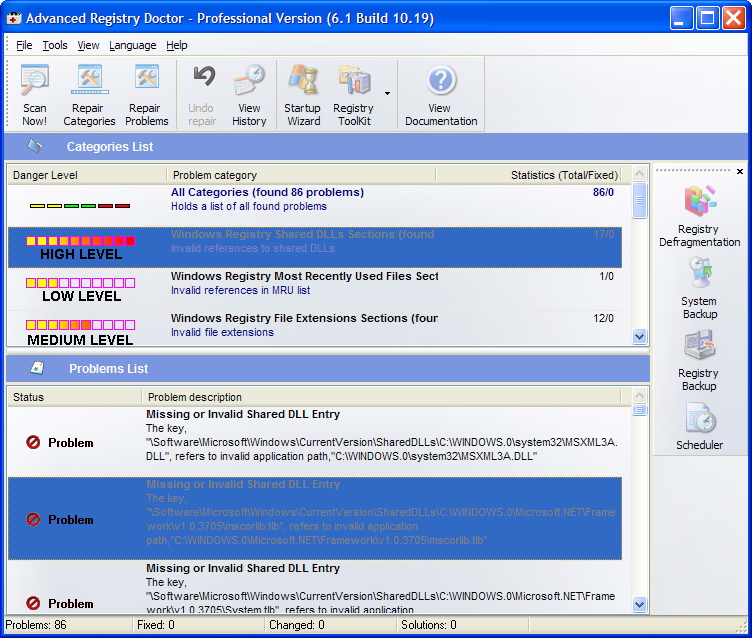
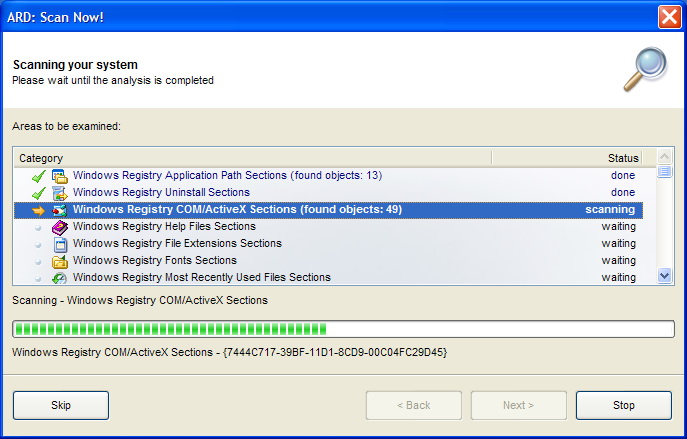
Advanced Registry Doctor Pro è un programma in grado di scansionare, diagnosticare e riparare molti problemi del registro di sistema (i quali sono spesso causa di crash e rallentamenti), migliorando sensibilmente le prestazioni del computer.
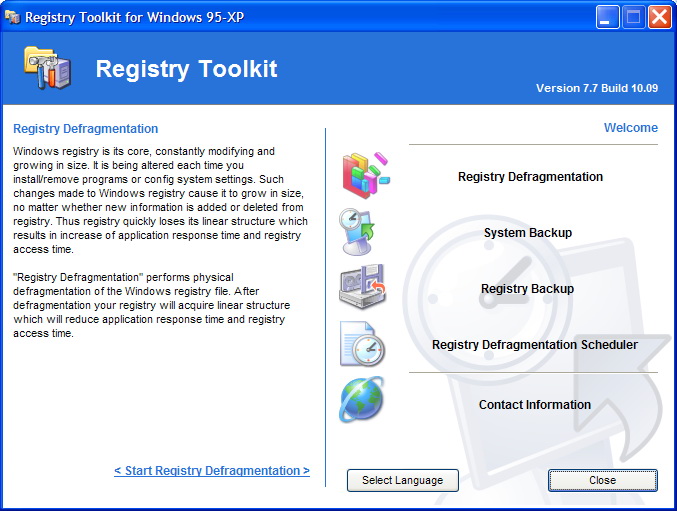
Inoltre, questo software offre una vasta gamma di opzioni avanzate, come la deframmentazione del registro, il pianificatore di operazioni, l’utility di backup e ripristino, la cronologia del registro e molto altro ancora.
The current text is the result of machine translation. You can help us improve it.
Requisiti di Sistema:
Windows 7/ Vista/ XP (x32/x64)
Produttore:
Elcor SoftwareHomepage:
http://www.elcor.net/ard.phpDimensione File:
4.20 MB
Prezzo:
$24.95
GIVEAWAY download basket




Commenti su Advanced Registry Doctor Pro 9.4
Please add a comment explaining the reason behind your vote.

For those who still pine for the reviews of Asharif, he viewed the previous version 9.2 here. Despite the not so good final grade, the product seems to have good value elements to it. Link to the previous review is below.
Personally, I am loath to play with the registry unless it's with a well known chrome plated quality utility. So I am going to chicken out and not try it, mostly because I don't have a 'play' computer handy.
http://dottech.org/gotdreviews/15624/review-advanced-registry-doctor-pro-9-2/

Firstly, you never ever need to clean your registry. Never. It doesn’t matter how many hundreds of thousands of registry errors you have as they are almost always harmless – and there is absolutely no need to remove them. Generally speaking, people who say otherwise are either misinformed or as is often the case make money from selling registry cleaners.
Secondly, cleaning the registry will rarely make your computer run faster of crash less. In fact cleaning the registry will often cause problems, since almost all registry cleaners (and yes, sadly even today’s giveaway) mistakenly identify needed registry keys as being errors. Understandably, removing these keys can cause problems.
In the description for today’s giveaway it is stated “…and significantly improves the speed of computer loading and performance.”
As I said earlier this will very rarely be the case. Ask yourself this – do you really want to use software from a publisher that feels it needs to lie to it’s customers in order to increase sales?
If you really insist on wanting to clean the registry, use Auslogics Registry Cleaner as it completely free and unlike Advanced Registry Doctor, is smart enough to not want to remove needed registry data.
This is for the developer really.
Maybe your target market is the group that has enough computer knowledge to understand what the scan results mean and thus is able to decide which ones to allow it to clean and proceed, that's fair enough.
There is another market that you could target. Computer users who absolutely need there computers NOT TO CRASH and do not have time or a clue what to do if they inadvertently cleaned something they subsequently needed.
I am one of these. I would like a nice clean fast running computer but referring to your screen shot, I have no idea what "Shared dll entry --- MSXML3A.dll" means and if its missing or invalid, weather you program would replace it or delete it and stuff relating to it or what. So I can't use your program.
So what I am trying to say is I need results that say something that means something to me like say
"an entry that relates to a program called "bestjpg editor" that was uninstalled last june needs deleting" then it would be of use.
You guys write what you know but this guys for one don't understand.
Well, personally I am very happy with the CCleaner which is free and besides registry cleaning does a very good job in cleaning the temporary files in the system.
#9: "Firstly, you never ever need to clean your registry. Never. It doesn’t matter how many hundreds of thousands of registry errors you have as they are almost always harmless – and there is absolutely no need to remove them."
Maybe...
1) Software install, update, & removal problems almost always center around keys/values that need to be removed from the registry.
2) Simple logic, if it takes longer for whatever app to open a very large file compared to a very small one, Why Wouldn't That Apply To Windows?
3) Some things are, or at least seem infinite -- however, everything concerning your Windows PC/laptop is finite, the registry included.
You can let a web browser cache build up, & just like many logging functions in Windows [set at defaults] when the space allotted fills up, older entries are deleted. The registry doesn't work that way. Since win95 when Windows started using a registry, when the number of entries reaches a certain point things slow down. You can leave things alone until you start approaching that point, but like an unorganized hall closet or garage or attic, when it becomes too full, cleaning it out is much more of a chore -- a difficult enough task that many people just chuck everything & start over, which is in fact what Microsoft & many users recommend, wipe the disk/partition & reinstall Windows & all your software. Or you can try & keep that closet (or Windows' registry) at least somewhat clean to begin with.
Consider that there are quite a few registry cleaning apps, yet there are not a lot of memory management apps, nor are there a lot of apps to manage processes/services, though both types of software make similar claims of boosting performance... that's an example of how the marketplace works, with buyers & users determining demand. Greater demand = more products & competition. Why are registry cleaning apps in demand? If they were pure snake oil wouldn't they be a bit rare like memory managers?
"... cleaning the registry will often cause problems ... mistakenly identify needed registry keys as being errors ... do you really want to use software from a publisher that feels it needs to lie to it’s customers... use Auslogics Registry Cleaner as it completely free and unlike Advanced Registry Doctor, is smart enough to not want to remove needed registry data..."
Cleaning the registry can cause problems, so back it up 1st with ERUNT & by setting a restore point -- with a restore & reboot problem solved. At one point people were scared to sail off the end of the world too. :-) I'm Not saying clean or don't clean the registry [that's obviously up to every individual], but at some point you either put the scare tactics into perspective or become afraid to leave your home. :-)
As far as registry errors go, no cleaner is "smart", not even your favorite brand. Fact is we're not talking about AI or anything close to it. Registry apps can A) do pattern matching, looking for whatever key/values that match whatever's stored in the app's code. And B) they can look for apparently dead shortcuts/pointers. There are registry keys/values that when they're present can or tend to cause problems -- you'll run into examples using Google/Bing to help troubleshoot a problem, or in most any on-line collection of Windows tips & tweaks. As far as what I called dead shortcuts/pointers goes, they're a reference to a file that doesn't exist, or often what appears to be a CLSID that doesn't also exist in other parts of the registry where it normally should. Obviously listing a filename with a path that doesn't exist on your hard drive can't be causing a compatibility problem, since there's nothing there, no file to open that could cause issues. Listing the wrong path could conceivably break something, but in my experience that only happens after an update with the "bad" value being a leftover pointing at the previous version. Deleting a value that looks like an orphan CLSID OTOH can cause a problem if/when that value wasn't really an orphan at all, but something used by whatever software. The same sort of thing can happen with other references too, e.g. MS Ofc most always has a few references in the registry to files that don't physically exist.
At any rate, Google shows "1,610,000 results" plugging in Advanced Registry Doctor -- it's been around a while -- check it out if you want. It may or may not be the best registry cleaner available, but someone's been buying it or it wouldn't still be here, plus I'm up to page 6 of those Google hits and haven't seen anything slamming the product. :-)
App gratis per iPhone »





App gratis per Android »





Ho installato il software su windows 7 - 64 e mi ha dato alcuni problemi:
1) la deframmentazione del registro si è bloccata e per terminare il programma ho dovuto riavviare il computer;
2) la scansione (opzione MS-DOS) è terminata con un errore del programma
Giudizio non positivo: valore (scala 1-10) 4.5
Save | Cancel
l'activate .exe non funziona
Save | Cancel