Ogni giorno offriamo programmi GRATUITI che altrimenti dovresti comprare!
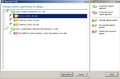
Giveaway of the day — Paragon Alignment Tool Special Edition (English Version)
Paragon Alignment Tool Special Edition (English Version) era disponibile come app gratuita il 13 ottobre 2010!

Aumenta le performance del 300% allineando le partizioni!
Funzionalità principali e Benefici del Paragon Alignment Tool 2.0 Special Edition:
- L'unico strumento che allinea le partizioni con una singola operazione
- Garantisce la sicurezza del sistema e dei dati presenti sul disco
- Aumenta le performance dei sottosistemi dei dischi di almeno tre volte
- Aumenta la resistenza dei drive SSD in maniera significativa
- Allinea le partizioni all'interno di un ambiente virtuale e nel sistema host
- Allinea le partizioni anche sui dischi super-capienti di 4K
- Tutti i nostri prodotti di punta includono questa utility di default
Conoscete maggiori dettagli sul programma e il suo utilizzo sul sito Internet di Paragon Alignment Tool.
Supporto Tecnico: durante il periodo della promozione, Paragon Software offre supporto tecnico su http://twitter.com/paragonsoftware. Potrete postare lì le vostre domande inerenti al download, alla registrazione e all’utilizzo del software. Il team di supporto di Paragon Software vi risponderà il prima possibile.
The current text is the result of machine translation. You can help us improve it.
Requisiti di Sistema:
Windows 2k/ XP/ Vista/ 7
Produttore:
Paragon SoftwareHomepage:
http://www.paragon-software.com/business/partition-alignment/index.htmlDimensione File:
68.2 MB
Prezzo:
$29.95
Programmi correlati

Lo strumento più sicuro per partizionare gli hard disk! Partizionare gli hard disk non è un gioco da ragazzi. Ecco perché milioni di persone si sono affidate delle nostre tecnologie sicure e stabili per ben 15 anni. L’edizione 11 del programma consente di organizzare facilmente i dischi fissi ed amministrare lo spazio libero per velocizzare il sistema.
NUOVA 2010 Advanced Edition – Protezione totale del PC per utenti seri! Prendete il controllo dello stato di sicurezza del vostro computer. Basato sulle solide soluzioni commerciali per il backup e il ripristino di Paragon, il nuovo Backup & Recovery 2010 Free Advanced Edition fornisce una così vasta gamma di opzioni di cui potete fidarvi ciecamente.

Non aspettate che il vostro computer vada incontro a chissà quale disastro – proteggete il vostro PC con questo programma per il recupero dei dati! Rescue Kit corregge i problemi legati alla fase di boot, recupera i dati quando i danni sono irreparabili e recupera partizioni cancellate. Tutto quello che dovete fare per usarlo è masterizzarlo su un qualsiasi CD/DVD!
Commenti su Paragon Alignment Tool Special Edition (English Version)
Please add a comment explaining the reason behind your vote.
Call me stupid, but what means to align partitions? (A short explanation should have been provided in the program's description.)

Paragon Alignment Tool - Background / Explanation
Physical disks are laid out in tracks. Apparently SSDs (Solid State Disks) also emulate this layout/structure. Usually partitioning tools start at the first available track on the disk and go from there mapping out blocks to the tracks. Often blocks will overlay boundaries between tracks due to their alignment (where in the first track the blocks began from) which means multiple operations will be needed to read (or write) that single block (as it spans multiple tracks). We can eliminate the overhead by ensuring that blocks sit entirely within tracks and do not span across track boundaries. Not only does this improve speed - but can extend the lifespan of SSD drives.
Partition alignment importance under Windows XP (32-bit and 64-bit)..why it helps with stuttering and increases drive working life. http://bit.ly/aZkE8m
(I'll probably come back and improve this explanation once I think of an easier way to explain it)
The before & after flash animation graphic at http://www.paragon-software.com/business/partition-alignment/index.html gives a visual explanation as to why efficiencies can be made by aligning partitions in some situations (RAID, SAN, Virtual Disks, 4K hard disks). Other people don't have anything much to gain (apparently).
According to the website, Partition Aligning feature is available across all Paragon's Flagship products which means, if you are a GAOTD regular and has downloaded Paragon's previous give aways, there is a high chance that you might already be having the ability to re-align the partitions! May be you can check the installed Paragon software for the feature before downloading. Just my 2 cents!
Again another good tool, but with one or two points.
If your running more than one disk that is in a RAID array hardware-based redundant array of independent disks (RAID) or a software-based RAID, then yes this CAN be beneficial to you, because it takes out the work of YOU using diskpart.exe and its dos based commands to get the same result.
If however you’re a normal Home user with a single or several single disks then why would you want to use it, because it won’t help you at all, reason: one disk cannot be out of alignment with its self.
So the short of it all.
If your running windows server 2003 XP in a raid format, and you don’t have one of the following installed:
Partition Manager Professional
Partition Manager Server
Partition Manager for Virtual Server
Hard Disk Manager Professional
Hard Disk Manager Workstation
Hard Disk Manager Server
Hard Disk Manager for Virtual Server
Then it could be useful to you, I myself prefer the Dos diskpart.exe method as it’s the one designed to do it, where as these are designed on top of the Dos command structure.
Everybody will be well advised to steer clear of this one. I just tried to align my C drive and it completely ruined my notebook. I had a dual boot xubuntu/win XP each on it's own partition. I stated this soft and it advised me I will have to reboot the machine to give it exclusive access to my C drive (the windrive) which I marked for realignment. I agreed, it started to run and it did something, I do not know what, but after restarting I am missing the grub bootloader and I can start neither Xubuntu nor XP. Fortunately I have another Xubuntu installed on an external harddisk from which I am writing right now. Will spend the rest of the day trying to resurrect my notebook. Bugger paragon for this.
App gratis per iPhone »





App gratis per Android »





salve potete rimetterlo mi sarebbe davvero di aiuto
Save | Cancel
idem... ho dovuto recuperare la partizione di sistema con ubuntu poiché mi ha cancellato l'mbr...
assolutamente un programma pericolosissimo!
Save | Cancel
Concordo con MaoMaoVero, se prorpio volete provare i benefici dell'allineamento: Fate immagine disco su dvd prima.
Provato su un portatile alla fine ha dato operating system missing, partition manager, sempre paragon dice unformatted.
"ai posteri l'ardua sentenza"
Save | Cancel
Non so se sia utile o meno, e sinceramente leggendo le info sul sito avrei detto che funzionava solo se usavi array (quindi configurazioni RAID). Invece l'ho lanciato sul mio pc, che non ha nessun RAID, e ha macinato per circa 3 ore. Il pc sembra uguale a prima, ma di sicuro funziona nuovamente (dual boot XP e 7).
Ora lo sto facendo girare su un hd esterno USB e ci sta mettendo un'eternità (ci vorranno in totale 15 ore circa, secondo la stima)... e non lo posso terminare! :-(
Save | Cancel
Per fortuna è arrivata la Paragon a dirci che gli hdd degli ultimi 10 anni (anche più?) sono tutti disallineati... ma per favore!!!!
POLLICE GIU!
Save | Cancel
Cos'è che fa?? Mai sentito.
Io mi affido a perfectdisk che al riavvio deframmenta mft, metadata ecc... costa ma è il migliore.
Attenti che è pericolosissimo questo!!!! Fate immagine disco su dvd prima!!!!!
Save | Cancel
ciao non hn capito niente di stò programma,come fa ad aumentare la velocità del 300% ? Mi sembra una bufala.
Save | Cancel