Italiano
Ogni giorno offriamo programmi GRATUITI che altrimenti dovresti comprare!
$19.99
SCADUTA
Giveaway of the day — Ashampoo Get Back Photo 1.0.1
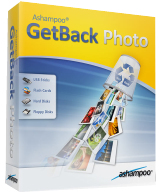
Il programma ti permette di recuperare foto in maniera rapida da diversi dispositivi di memoria.
$19.99
SCADUTA
User Rating:
115
Lascia un commento
Ashampoo Get Back Photo 1.0.1 era disponibile come app gratuita il 07 dicembre 2015!
Oggi Giveaway of the Day

Rileva ed elimina i duplicati di canzoni in iTunes!

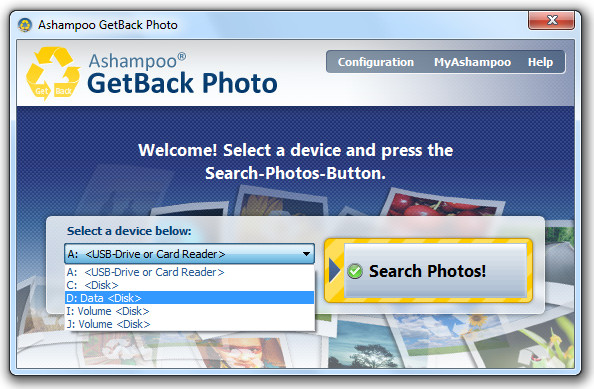
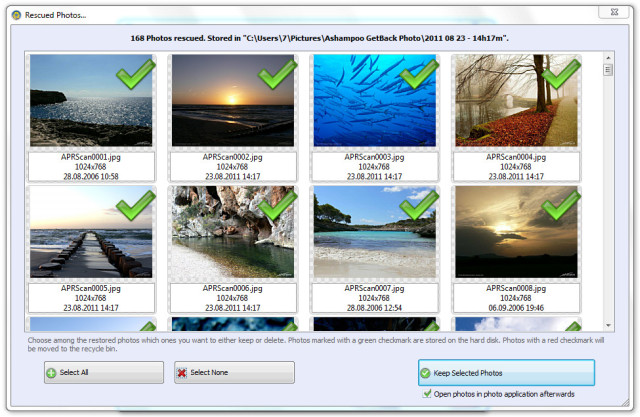
Recupera foto digitali smarrite con Ashampoo GetBack Photo. Il programma ti permette di recuperare foto in maniera rapida da diversi dispositivi di memoeria in pochi passi. Ashampoo GetBack Photo recupera non solo le foto che sono state cancellate "normalmente", ma anche immagini da dispositivi di memoria che sono stati formattati.
Caratteristiche principali:
- Recupero di file immagini cancellati o danneggiati;
- Scansione di tutti i dispositivi di memoria nel sistema;
- È possibile persino ritrovare le foto, dopo la formattazione del dispositivo di memoria;
- Venggono recuperati anche i metadati, p.e. EXIF e IPTC;
- Supporta tutti i formati di file comuni, p.e. JPG, PNG, BMP, GIF, RAW;
- Le foto possono anche essere trovare in documenti PDF e Word;
- Visualizzazione di foto recuperabili in miniatura.
The current text is the result of machine translation. You can help us improve it.
Requisiti di Sistema:
Windows XP/ Vista/ 7/ 8; For Windows XP Service Pack 2 or higher is recommended; RAM: min. 256 MB; Disk Space: min. 17 MB
Produttore:
Ashampoo GmbH & CoHomepage:
https://www.ashampoo.com/en/usd/pin/0073/tools-and-utilities/Ashampoo-GetBack-PhotoDimensione File:
9.6 MB
Prezzo:
$19.99
App gratis per iPhone »

Waltz of the Wizard is a first-person magic simulator inspired by the wonders of classical fantasy.
$8.99 ➞ gratis oggi

Otter checks food that suits well with the body, and sometimes, it reflects on bad food choices.
$1.99 ➞ gratis oggi

$0.99 ➞ gratis oggi

This app will help your child recognize, spell, pronounce and learn more about 550 everyday words.
$9.99 ➞ gratis oggi

Welcome to Think & Tap!, the ultimate brain teaser designed to test your logic and sharpen your mind!
$4.99 ➞ gratis oggi
App gratis per Android »

$4.99 ➞ gratis oggi

Merge Cafe is a brand new merge game where you can combine tasty treats to make them even sweeter.
$4.99 ➞ gratis oggi
$1.79 ➞ gratis oggi

Beautiful transparent Square icon packs in neon colors with lines around them.
$1.49 ➞ gratis oggi

Material You Square is a line Square icon pack with a design inspired by material you.
$1.49 ➞ gratis oggi
Commenti su Ashampoo Get Back Photo 1.0.1
Please add a comment explaining the reason behind your vote.
As usual a very nice program from aShampoo, unless I am using it wrongly it works a bit too well... After scanning my C:\ drive for about 10 minutes it said it was about 1% completed and had already found 17,000+ files. I stopped and checked and found nearly all of them were tiny png's and jpg's that had come from internet browsing and been deleted during cleanups.
On this basis it would have taken many hours to scan the drive and produced a million or more tiny objects.... I probably would never have found one particular file I was looking for in all the rubbish. Ron
Save | Cancel
It would be much more usable if you could specify the smallest file to "find".... say 20k then you would mainly only get usable photos
Save | Cancel
Thank you , Thank you, Thank you, Thank you. I have been able to access discs that my damn DVD/CD writer didn't write properly. I did 45 discs before the hard drive gave up the ghost but didn't realise that the unit was screwed. These were pictures of my daughter who died some years ago and many other precious images. The computer just goes into over drive and nothing can read what is on them. This has just finished the first disc and retrieved precious photos I thought I had lost. Thank you so so much I thought they were lost for ever
Save | Cancel
Tested this on a flash drive, the results were impressive.
What a shame that some method of filtration, file type, file size and folder selection, would have made it so much better.
It found about 8,000 files on this 8 gig flash drive 6500 of them being GIF files or files too small to be of any use.
Doesn't seem to be any improvement since the last time it was given away here, a great pity as it has potential.
Save | Cancel
I have tried previously offered progs which insist on scanning the entire drive. I am short of time and patience. Will this prog allow me to choose a certain folder and scan only that folder? Thank you.
Save | Cancel
It has to scan the entire volume to find the lost files. Folders are just a way of displaying data so it's easy for the human sitting at the computer to locate. In reality, the data is not stored in folders. These are only virtual and files within the same folder can be stored all over the actual disk in different places. That's why most legitimate data recovery software will need to scan.
Save | Cancel